---
title: Hospitality Food and Beverage Report (Schedule 2)
description: Analyze revenue and expenses to optimize food and beverage operations with Docyt's 'Schedule 2' report, driving profitability in the hospitality industry.
---
[Skip to content](https://pages.docyt.com/knowledge/maximizing-profitability-analyzing-food-and-beverage-operations-with-the-schedule-2-report#main-content)
[](https://docyt.com/)
- [Help Center](https://pages.docyt.com/knowledge)
Open main navigation
Close main navigation
- [Help Center](https://pages.docyt.com/knowledge)
- [Sign in to Docyt](https://app.docyt.com/sign_in)
[Sign in to Docyt](https://app.docyt.com/sign_in)
How can we help you?
- There are no suggestions because the search field is empty.
1. [Help Center](https://pages.docyt.com/knowledge?hsLang=en)
2. [Business Reports & Budgets](https://pages.docyt.com/knowledge/business-reports-budgets?hsLang=en)
3. [For Hospitality Businesses](https://pages.docyt.com/knowledge/business-reports-budgets?hsLang=en#for-hospitality-businesses)
# Hospitality Food and Beverage Report (Schedule 2)
**Table of Contents**
- [Accessing the Report](https://pages.docyt.com/knowledge/maximizing-profitability-analyzing-food-and-beverage-operations-with-the-schedule-2-report#Access)
- [Report Customization](https://pages.docyt.com/knowledge/maximizing-profitability-analyzing-food-and-beverage-operations-with-the-schedule-2-report#Customization)
- [Excel or PDF Format Export](https://pages.docyt.com/knowledge/maximizing-profitability-analyzing-food-and-beverage-operations-with-the-schedule-2-report#Excel)
- [Report Content Breakdown](https://pages.docyt.com/knowledge/maximizing-profitability-analyzing-food-and-beverage-operations-with-the-schedule-2-report#Sections)
- [Advantages of the Report](https://pages.docyt.com/knowledge/maximizing-profitability-analyzing-food-and-beverage-operations-with-the-schedule-2-report#Benefits)
- [Sample Report](https://pages.docyt.com/knowledge/maximizing-profitability-analyzing-food-and-beverage-operations-with-the-schedule-2-report#Sample1)
- [Troubleshooting Inaccurate Data](https://pages.docyt.com/knowledge/maximizing-profitability-analyzing-food-and-beverage-operations-with-the-schedule-2-report#Accurate)
### **Accessing the Report**
1. Log in to your Docyt account.
2. From the top navigation menu, select 'Business Reports' from the drop-down menu. In the subsequent menu, choose 'Departmental Reports'.
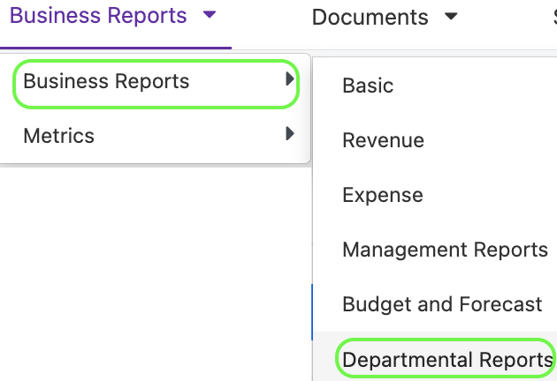
3. On the Departmental Reports page, locate and click the 'Food and Beverage' option to access the report.

4. Customize the report parameters, such as selecting the desired period and column options.
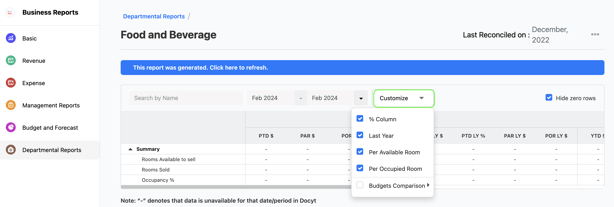
1. Incorporate Budget columns into your reports. [Click here to learn more](https://pages.docyt.com/knowledge/viewing-budget-against-report-data-in-docyt?hsLang=en).
5. Generate the report and review the detailed results to gain valuable insights into revenue performance and financial accuracy.
Limited Access: This report is exclusively available for select Docyt Plans. If you don't have access, please get in touch with support@docyt.com for help.
### Report Customization
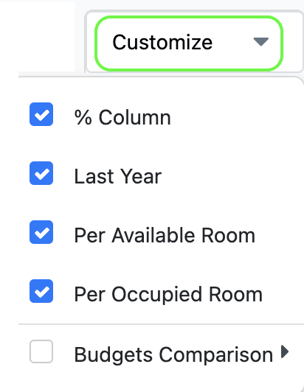
1. Use the drop-down menu in departmental reports to add new columns based on the selections.

2. Click 'Customize' to add new columns to the report, namely Last Year, Per Available Room (PAR), Per Occupied Room (POR), and Budgets Comparison.
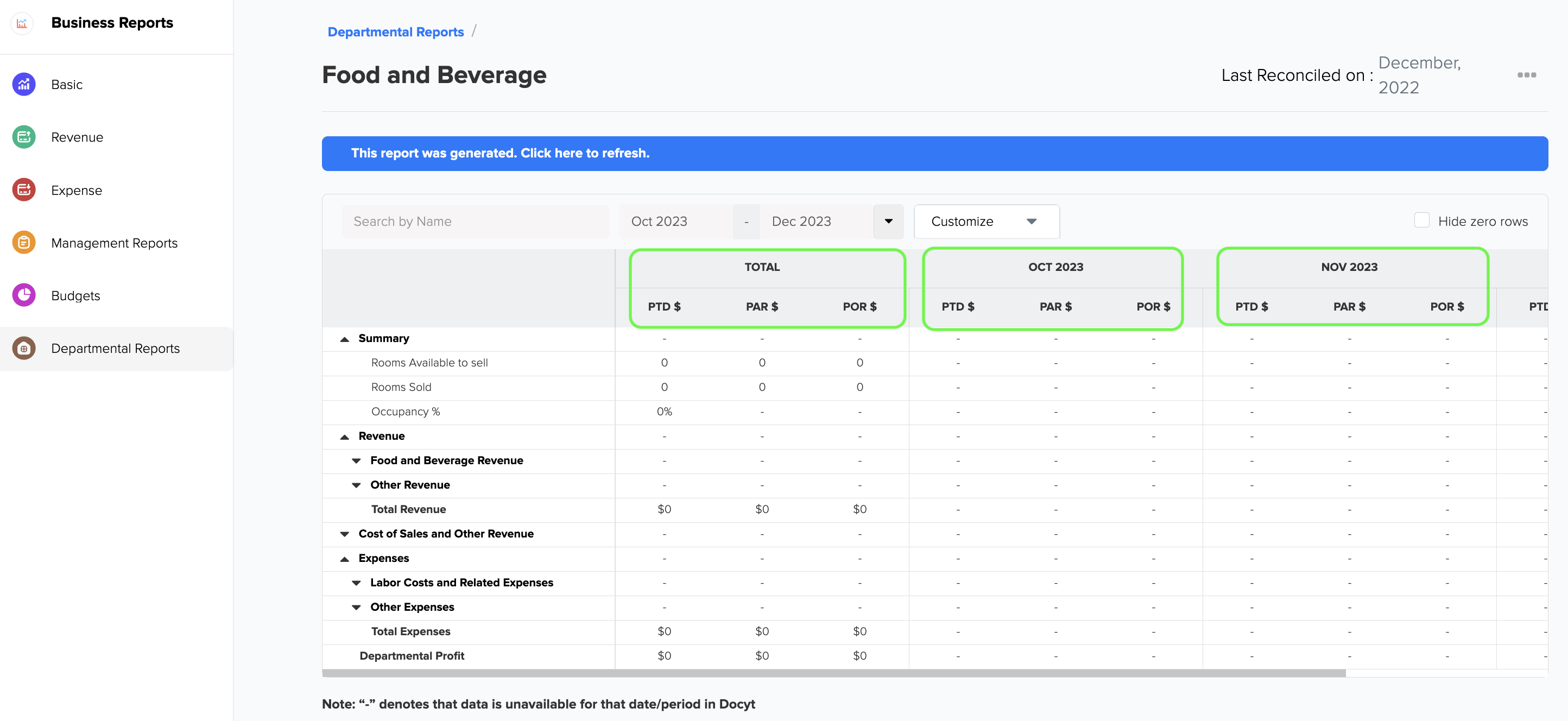
3. You can also customize the report columns for multiple months.
4. The table below provides the formula for calculating **PAR $** (Per Available Room) and **POR $** (Per Occupied Room) for both the **Period to Date** and **Year to Date**, respectively. This information can be found in row 3 of the below table.
| **PTD (Period To Date)** | ** YTD (Year To Date)** | | | | |
| --- | --- | --- | --- | --- | --- |
| **PTD $** | **PAR $** | **POR $** | **YTD $** | **PAR $** | **POR $** |
| PTD Amount | (PTD Amount) ÷ (Rooms Available to Sell) | (PTD Amount) ÷ (Rooms Sold) | YTD Amount | (YTD Amount) ÷ (Rooms Available to Sell) | (YTD Amount) ÷ (Rooms Sold) |
5. You can also customize the columns in the report at the first level of data drill-down using the drop-down menu. This allows you to personalize the report further and tailor it to your specific needs.
### Export Report to Excel or PDF format
1. 1. Generate and review the desired report in Docyt.
2. To export your report to Excel or PDF format, go to the top right corner of the report page and find the three-dots menu icon (...). Click on the three dots to reveal the menu options, and from there, select either 'Export as Excel' or 'Export as PDF'.
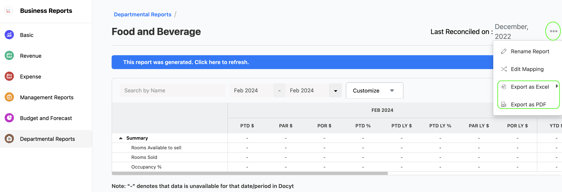
3. A notification will appear, indicating that the report can be downloaded from the 'Data Export' section of Docyt.

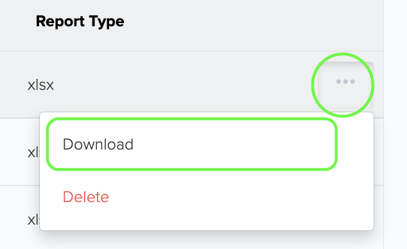
4. To download the report, navigate to the 'Data Export' section by clicking on the 'Data Export' link mentioned in the notification. On the 'Data Export' page, click on the ellipsis menu and select the 'Download' option.
### **Components and Sections of the Report**
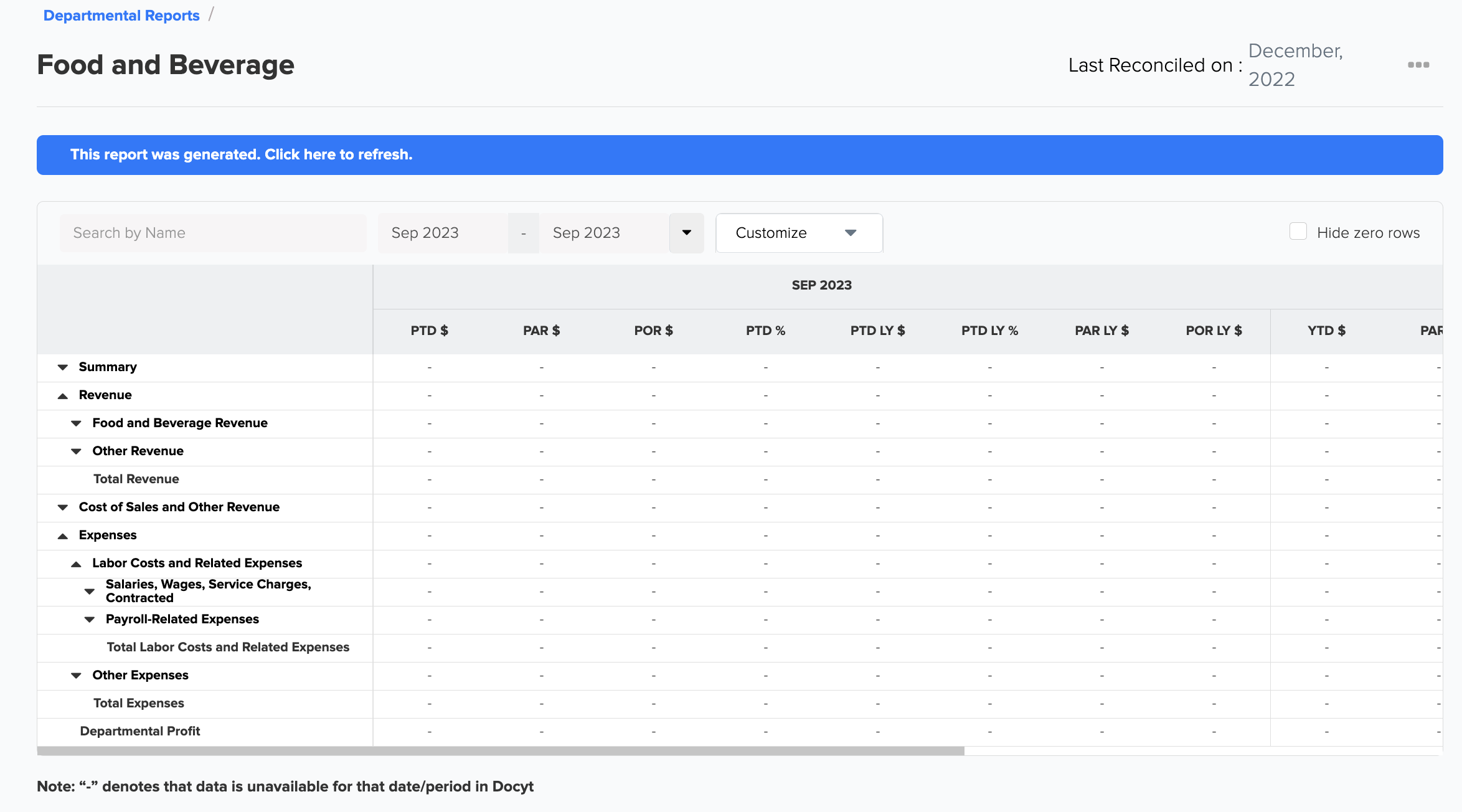
The 'Schedule 2 - Food and Beverage' report is organized into several detailed sections:
1. **Revenue**: Revenue includes all sales of food and beverages for guest consumption as well as specific services, charges, and non-consumable goods sold or applied in the Food and Beverage department as Other Revenue. This includes Food Revenue (Venue Food Revenue, In-Room Dining Food Revenue, Banquet/Conference/Catering Food Revenue, Mini Bar Food Revenue, Other Food Revenue, and Total Food Revenue) and Beverage Revenue (broken down similarly).
1. Food Revenue
2. Beverage Revenue
1. **Other Revenue**: Other Revenue includes sales of services and all products that are not consumable food and beverage items. Here, you'll find specific categories like Audiovisual, Function Room Rentals, Setup Charges, Cover Charges, Surcharges and Service Charges, and Miscellaneous Other Revenue.
2. **Cost of Sales and Other Revenue**: This involves the costs related to Food and Beverage Sales (including the specific costs of food and beverage sales) and Other Revenue (including Audiovisual and miscellaneous Costs).
3. **Gross Profit**: Gross Profit is calculated by subtracting **Total Cost of Sales and Other Revenue** from **Total Revenue** for the Food and Beverage department. Total Revenue is the sum of **Total Food and Beverage Revenue** and **Total Other Revenue**. The percentage for Gross Profit is calculated by dividing the dollar amount of Gross Profit by the Total Revenue for the Food and Beverage department.
4. **Expenses**:
Food and Beverage department expenses are separated into two major categories:
1. Labor Costs and Related Expenses.
2. Other Expenses.
This section provides a comprehensive view of Labor Costs and Related Expenses (including detailed breakdowns of salaries, wages, service charges, contracted labor, bonuses, incentives, and payroll-related expenses) and Other Expenses (including a wide array of specific cost categories).
5. **Departmental Profit**: Departmental Profit is calculated by subtracting Total Expenses from Gross Profit. The percentage for Departmental Profit is calculated by dividing Departmental Profit by Total Revenue for the Food and Beverage department.
### Sample Report
### **What to do if Report Data is not Accurate**
For inaccurate data:
Consult with your Docyt Account Manager for guidance and resolution.
For general support questions, please email Docyt support at [support@docyt.com](mailto:support@docyt.com) for help in troubleshooting and resolving any discrepancies.
### **Benefits**
- **Detailed Revenue Analysis**: By breaking down revenue into specific categories, the report helps you understand precisely from where your income comes.
- **Comprehensive Expense Tracking**: The report details your expenses, helping you identify areas for potential cost reduction.
- **Profitability Overview**: With a clear view of gross and departmental profit, you can better assess your overall profitability and make necessary adjustments.
With the 'Schedule 2 - Food and Beverage' report, you can thoroughly analyze your food and beverage operations and guide your business towards greater profitability. Use this detailed analysis to fine-tune your processes and improve your financial outcomes.
#### Hospitality Brands that Trust Docyt
#### Docyt is a Hospitality and Lodging Industry Partner

### We greatly appreciate your feedback!
👍 Vote for helpfulness! Your feedback matters. Let us know if our articles are helpful to you. Your vote counts!
- [Docyt Setup, Personal & Business Settings](https://pages.docyt.com/knowledge/docyt-setup-personal-business-settings?hsLang=en#main-content)
- [Accountant/CPA Access](https://pages.docyt.com/knowledge/docyt-setup-personal-business-settings?hsLang=en#accountant-cpa-access)
- [User Settings](https://pages.docyt.com/knowledge/docyt-setup-personal-business-settings?hsLang=en#user-settings)
- [Business & Personal Settings](https://pages.docyt.com/knowledge/docyt-setup-personal-business-settings?hsLang=en#business-personal-settings)
- [Categories & Chart Of Accounts Setup](https://pages.docyt.com/knowledge/docyt-setup-personal-business-settings?hsLang=en#categories-chart-of-accounts-setup)
- [Docyt Setup](https://pages.docyt.com/knowledge/docyt-setup-personal-business-settings?hsLang=en#docyt-setup)
- [Billing](https://pages.docyt.com/knowledge/docyt-setup-personal-business-settings?hsLang=en#billing)
- [Navigation & Getting Started](https://pages.docyt.com/knowledge/navigation-getting-started?hsLang=en)
- [Top FAQs from Business Owners](https://pages.docyt.com/knowledge/top-faqs-from-business-owners?hsLang=en#main-content)
- [Cheat Sheets](https://pages.docyt.com/knowledge/top-faqs-from-business-owners?hsLang=en#cheat-sheets)
- [Docyt Mobile App](https://pages.docyt.com/knowledge/docyt-mobile-app?hsLang=en#main-content)
- [Important Tasks](https://pages.docyt.com/knowledge/docyt-mobile-app?hsLang=en#important-tasks)
- [Setup](https://pages.docyt.com/knowledge/docyt-mobile-app?hsLang=en#setup)
- [Accounts Payable](https://pages.docyt.com/knowledge/docyt-mobile-app?hsLang=en#accounts-payable)
- [Reports](https://pages.docyt.com/knowledge/docyt-mobile-app?hsLang=en#reports)
- [Expense](https://pages.docyt.com/knowledge/expense?hsLang=en#main-content)
- [Setup](https://pages.docyt.com/knowledge/expense?hsLang=en#setup)
- [The UPS Store®](https://pages.docyt.com/knowledge/expense?hsLang=en#the-ups-store)
- [Document Management](https://pages.docyt.com/knowledge/expense?hsLang=en#document-management)
- [Vendor Credits](https://pages.docyt.com/knowledge/expense?hsLang=en#vendor-credits)
- [Accounts Payable Approval Settings](https://pages.docyt.com/knowledge/expense?hsLang=en#accounts-payable-approval-settings)
- [Bill Pay](https://pages.docyt.com/knowledge/expense?hsLang=en#bill-pay)
- [Vendors & Payees](https://pages.docyt.com/knowledge/expense?hsLang=en#vendors-payees)
- [Invoice Queue](https://pages.docyt.com/knowledge/expense?hsLang=en#invoice-queue)
- [Flagged Transactions & Document Requests](https://pages.docyt.com/knowledge/flagged-transactions-document-requests?hsLang=en)
- [Financial Connections](https://pages.docyt.com/knowledge/financial-connections?hsLang=en#main-content)
- [Setup & Configuration](https://pages.docyt.com/knowledge/financial-connections?hsLang=en#setup-configuration)
- [Banking Accounts Transactions](https://pages.docyt.com/knowledge/financial-connections?hsLang=en#banking-accounts-transactions)
- [Expense Reports & Employee Reimbursement](https://pages.docyt.com/knowledge/expense-reports-employee-reimbursement?hsLang=en#main-content)
- [For Employers](https://pages.docyt.com/knowledge/expense-reports-employee-reimbursement?hsLang=en#for-employers)
- [Receipt Management](https://pages.docyt.com/knowledge/receipt-management?hsLang=en#main-content)
- [Setup & Configuration](https://pages.docyt.com/knowledge/receipt-management?hsLang=en#setup-configuration)
- [Scan & Upload, Email, or Drag & Drop Receipts](https://pages.docyt.com/knowledge/receipt-management?hsLang=en#scan-upload-email-or-drag-drop-receipts)
- [Approve Receipts](https://pages.docyt.com/knowledge/receipt-management?hsLang=en#approve-receipts)
- [Split Receipts](https://pages.docyt.com/knowledge/receipt-management?hsLang=en#split-receipts)
- [Business Reports & Budgets](https://pages.docyt.com/knowledge/business-reports-budgets?hsLang=en#main-content)
- [Budget](https://pages.docyt.com/knowledge/business-reports-budgets?hsLang=en#budget)
- [For Hospitality Businesses](https://pages.docyt.com/knowledge/business-reports-budgets?hsLang=en#for-hospitality-businesses)
- [UPS Store®](https://pages.docyt.com/knowledge/business-reports-budgets?hsLang=en#ups-store)
- [For Quick Service Restaurants](https://pages.docyt.com/knowledge/business-reports-budgets?hsLang=en#for-quick-service-restaurants)
- [Business](https://pages.docyt.com/knowledge/business-reports-budgets?hsLang=en#business)
- [Setup](https://pages.docyt.com/knowledge/business-reports-budgets?hsLang=en#setup)
- [Import, Export & Share Data](https://pages.docyt.com/knowledge/business-reports-budgets?hsLang=en#import-export-share-data)
- [SaaS](https://pages.docyt.com/knowledge/business-reports-budgets?hsLang=en#saas)
- [Troubleshooting](https://pages.docyt.com/knowledge/business-reports-budgets?hsLang=en#troubleshooting)
- [Revenue Integration & Reconciliation](https://pages.docyt.com/knowledge/revenue-integration-reconciliation?hsLang=en#main-content)
- [Hospitality Revenue System Integrations](https://pages.docyt.com/knowledge/revenue-integration-reconciliation?hsLang=en#hospitality-revenue-system-integrations)
- [Daily Tasks](https://pages.docyt.com/knowledge/revenue-integration-reconciliation?hsLang=en#daily-tasks)
- [Reconciliation Center](https://pages.docyt.com/knowledge/reconciliation-center?hsLang=en#main-content)
- [Setup](https://pages.docyt.com/knowledge/reconciliation-center?hsLang=en#setup)
- [Continuous Bank Reconciliation](https://pages.docyt.com/knowledge/reconciliation-center?hsLang=en#continuous-bank-reconciliation)
- [Month-End Book Closing Process](https://pages.docyt.com/knowledge/reconciliation-center?hsLang=en#month-end-book-closing-process)
- [Chart of Accounts](https://pages.docyt.com/knowledge/reconciliation-center?hsLang=en#chart-of-accounts)
- [Accounts Receivable](https://pages.docyt.com/knowledge/accounts-receivable?hsLang=en)
- [Business Mailroom](https://pages.docyt.com/knowledge/business-mailroom?hsLang=en)
- [Accountant](https://pages.docyt.com/knowledge/accountant?hsLang=en#main-content)
- [Setup & Configuration](https://pages.docyt.com/knowledge/accountant?hsLang=en#setup-configuration)
- [Product Updates](https://pages.docyt.com/knowledge/product-updates?hsLang=en#main-content)
- [May 2024](https://pages.docyt.com/knowledge/product-updates?hsLang=en#may-2024)
- [April 2024](https://pages.docyt.com/knowledge/product-updates?hsLang=en#april-2024)
- [August 2023](https://pages.docyt.com/knowledge/product-updates?hsLang=en#august-2023)
- [July 2023](https://pages.docyt.com/knowledge/product-updates?hsLang=en#july-2023)
- [Docyt Check](https://pages.docyt.com/knowledge/docyt-check?hsLang=en)
- [Banking & Reconciliation](https://pages.docyt.com/knowledge/banking-reconciliation?hsLang=en#main-content)
- [Bank Statements](https://pages.docyt.com/knowledge/banking-reconciliation?hsLang=en#bank-statements)
[](http://docyt.com)
Copyright © 2025, Docyt Inc.