---
title: UPS® Store Vendor Expense Report
description: Learn how to access, export, and analyze the UPS® Store Vendor Expense Report in Docyt for streamlined expense management and cost optimization. Resolve data inaccuracies with expert guidance.
---
[Skip to content](https://pages.docyt.com/knowledge/mastering-ups-store-vendor-expense-report#main-content)
[](https://docyt.com/)
- [Help Center](https://pages.docyt.com/knowledge)
Open main navigation
Close main navigation
- [Help Center](https://pages.docyt.com/knowledge)
- [Sign in to Docyt](https://app.docyt.com/sign_in)
[Sign in to Docyt](https://app.docyt.com/sign_in)
How can we help you?
- There are no suggestions because the search field is empty.
1. [Help Center](https://pages.docyt.com/knowledge?hsLang=en)
2. [Business Reports & Budgets](https://pages.docyt.com/knowledge/business-reports-budgets?hsLang=en)
3. [UPS Store®](https://pages.docyt.com/knowledge/business-reports-budgets?hsLang=en#ups-store)
# UPS® Store Vendor Expense Report
**Table of Contents**
- [Accessing the Report](https://pages.docyt.com/knowledge/mastering-ups-store-vendor-expense-report#Accessing)
- [Excel or PDF Format Export](https://pages.docyt.com/knowledge/mastering-ups-store-vendor-expense-report#Excel)
- [Report Content Breakdown](https://pages.docyt.com/knowledge/mastering-ups-store-vendor-expense-report#Sections)
- [Advantages of the Report](https://pages.docyt.com/knowledge/mastering-ups-store-vendor-expense-report#Benefits)
- [Troubleshooting Inaccurate Data](https://pages.docyt.com/knowledge/mastering-ups-store-vendor-expense-report#Accurate)
---
### **Accessing The Report**
To access the UPS® Store Vendor Expense Report in Docyt, please follow these steps:
1. Sign in to your Docyt account.
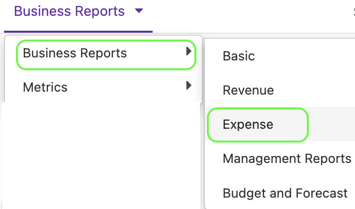
2. Navigate to 'Business Reports' through the drop-down options in the top navigation menu.
3. Select 'Expense' from the ensuing menu.
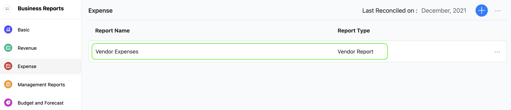
4. Within the Expense Reports page, locate and select 'Vendor Expenses' or 'Vendor Report'.
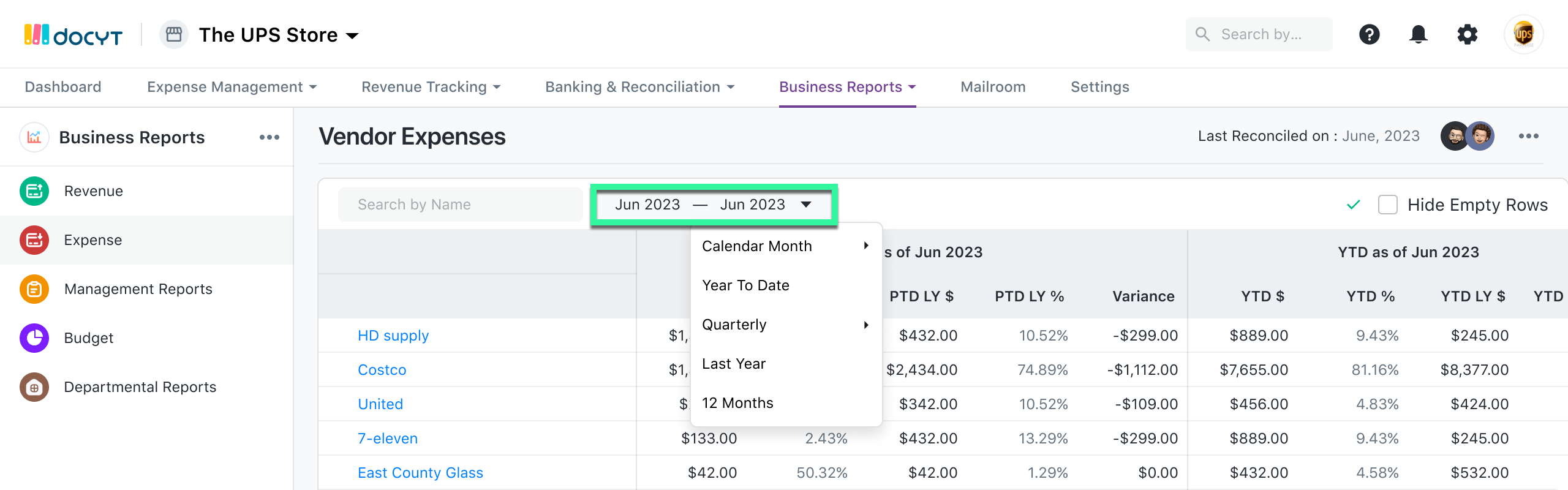
5. You can modify the report parameters to suit your needs by tailoring the report's timeframe, excluding rows with zero values, or using the 'Search By Name' feature to find a specific vendor.
As you know, access to this report is reserved for specific Docyt plans. If you cannot access this report, please get in touch with our support team at [support@docyt.com](mailto:support@docyt.com) for assistance.
### **Export Your Report To Excel or PDF Format**
- Generate and review the desired report in Docyt.
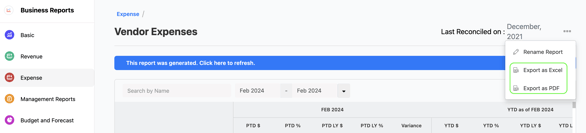
- To export your report to Excel or PDF format, go to the top right corner of the report page and find the three-dots menu icon (...). Click on the three dots to reveal the menu options, and from there, select 'Export as Excel' or 'Export as PDF'.
- A notification will appear, indicating that the report can be downloaded from the 'Data Export' section of Docyt.

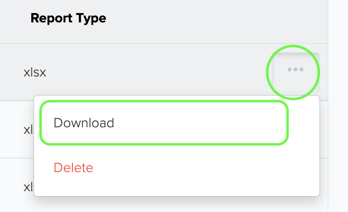
- To download the report, navigate to the 'Data Export' section by clicking the 'Data Export' link in the notification. Click the ellipsis menu on the 'Data Export' page and select the 'Download' option.
### Understanding the Report
The Vendor Expense Report consists of columns displaying a list of vendors along with several critical calculation columns:
- PTD $: This represents the 'Period-to-Date' dollar amount for each vendor.
- PTD LY $: This refers to 'Period-to-Date Last Year', detailing expenses from the corresponding period of the previous year.
- PTD Variance: This column indicates the variation in expenses compared to the same period last year.
- YTD $: 'Year-to-Date' presents the total expenses accumulated for the current year.
- YTD %: This column shows the percentage of the total expense to date for the current year.
- YTD LY $: 'Year-to-Date Last Year' highlights the accumulated expenses for the corresponding period of the previous year.
- YTD Variance: This illustrates the change in expenses compared to the previous year.
The report delivers a holistic view of your vendor expenses, empowering you to analyze and monitor spending trends effectively.
### Benefits
Employing the UPS® Store Vendor Expense Report can yield several advantages:
- Streamlined Expense Management: Centralize all vendor-related expenses into one report, facilitating efficient budget tracking and management.
- Cost Reduction Opportunities: Scrutinize expense trends and variances to identify potential cost reduction and optimization avenues.
- Improved Vendor Relations: Utilize data-driven decisions derived from expense insights to enhance vendor relationships and negotiate better terms.
### For Inaccuracies in the Report Data
For inaccurate data:
- Consult with your Docyt Account Manager for guidance and resolution.
- For general support questions, please email Docyt support at [support@docyt.com](mailto:support@docyt.com) for help troubleshooting and resolving discrepancies.
### We greatly appreciate your feedback!
👍 Vote for helpfulness! Your feedback matters. Let us know if our articles are helpful to you. Your vote counts!
- [Docyt Setup, Personal & Business Settings](https://pages.docyt.com/knowledge/docyt-setup-personal-business-settings?hsLang=en#main-content)
- [Accountant/CPA Access](https://pages.docyt.com/knowledge/docyt-setup-personal-business-settings?hsLang=en#accountant-cpa-access)
- [User Settings](https://pages.docyt.com/knowledge/docyt-setup-personal-business-settings?hsLang=en#user-settings)
- [Business & Personal Settings](https://pages.docyt.com/knowledge/docyt-setup-personal-business-settings?hsLang=en#business-personal-settings)
- [Categories & Chart Of Accounts Setup](https://pages.docyt.com/knowledge/docyt-setup-personal-business-settings?hsLang=en#categories-chart-of-accounts-setup)
- [Docyt Setup](https://pages.docyt.com/knowledge/docyt-setup-personal-business-settings?hsLang=en#docyt-setup)
- [Billing](https://pages.docyt.com/knowledge/docyt-setup-personal-business-settings?hsLang=en#billing)
- [Navigation & Getting Started](https://pages.docyt.com/knowledge/navigation-getting-started?hsLang=en)
- [Top FAQs from Business Owners](https://pages.docyt.com/knowledge/top-faqs-from-business-owners?hsLang=en#main-content)
- [Cheat Sheets](https://pages.docyt.com/knowledge/top-faqs-from-business-owners?hsLang=en#cheat-sheets)
- [Docyt Mobile App](https://pages.docyt.com/knowledge/docyt-mobile-app?hsLang=en#main-content)
- [Important Tasks](https://pages.docyt.com/knowledge/docyt-mobile-app?hsLang=en#important-tasks)
- [Setup](https://pages.docyt.com/knowledge/docyt-mobile-app?hsLang=en#setup)
- [Accounts Payable](https://pages.docyt.com/knowledge/docyt-mobile-app?hsLang=en#accounts-payable)
- [Reports](https://pages.docyt.com/knowledge/docyt-mobile-app?hsLang=en#reports)
- [Expense](https://pages.docyt.com/knowledge/expense?hsLang=en#main-content)
- [Setup](https://pages.docyt.com/knowledge/expense?hsLang=en#setup)
- [The UPS Store®](https://pages.docyt.com/knowledge/expense?hsLang=en#the-ups-store)
- [Document Management](https://pages.docyt.com/knowledge/expense?hsLang=en#document-management)
- [Vendor Credits](https://pages.docyt.com/knowledge/expense?hsLang=en#vendor-credits)
- [Accounts Payable Approval Settings](https://pages.docyt.com/knowledge/expense?hsLang=en#accounts-payable-approval-settings)
- [Bill Pay](https://pages.docyt.com/knowledge/expense?hsLang=en#bill-pay)
- [Vendors & Payees](https://pages.docyt.com/knowledge/expense?hsLang=en#vendors-payees)
- [Invoice Queue](https://pages.docyt.com/knowledge/expense?hsLang=en#invoice-queue)
- [Flagged Transactions & Document Requests](https://pages.docyt.com/knowledge/flagged-transactions-document-requests?hsLang=en)
- [Financial Connections](https://pages.docyt.com/knowledge/financial-connections?hsLang=en#main-content)
- [Setup & Configuration](https://pages.docyt.com/knowledge/financial-connections?hsLang=en#setup-configuration)
- [Banking Accounts Transactions](https://pages.docyt.com/knowledge/financial-connections?hsLang=en#banking-accounts-transactions)
- [Expense Reports & Employee Reimbursement](https://pages.docyt.com/knowledge/expense-reports-employee-reimbursement?hsLang=en#main-content)
- [For Employers](https://pages.docyt.com/knowledge/expense-reports-employee-reimbursement?hsLang=en#for-employers)
- [Receipt Management](https://pages.docyt.com/knowledge/receipt-management?hsLang=en#main-content)
- [Setup & Configuration](https://pages.docyt.com/knowledge/receipt-management?hsLang=en#setup-configuration)
- [Scan & Upload, Email, or Drag & Drop Receipts](https://pages.docyt.com/knowledge/receipt-management?hsLang=en#scan-upload-email-or-drag-drop-receipts)
- [Approve Receipts](https://pages.docyt.com/knowledge/receipt-management?hsLang=en#approve-receipts)
- [Split Receipts](https://pages.docyt.com/knowledge/receipt-management?hsLang=en#split-receipts)
- [Business Reports & Budgets](https://pages.docyt.com/knowledge/business-reports-budgets?hsLang=en#main-content)
- [Budget](https://pages.docyt.com/knowledge/business-reports-budgets?hsLang=en#budget)
- [For Hospitality Businesses](https://pages.docyt.com/knowledge/business-reports-budgets?hsLang=en#for-hospitality-businesses)
- [UPS Store®](https://pages.docyt.com/knowledge/business-reports-budgets?hsLang=en#ups-store)
- [For Quick Service Restaurants](https://pages.docyt.com/knowledge/business-reports-budgets?hsLang=en#for-quick-service-restaurants)
- [Business](https://pages.docyt.com/knowledge/business-reports-budgets?hsLang=en#business)
- [Setup](https://pages.docyt.com/knowledge/business-reports-budgets?hsLang=en#setup)
- [Import, Export & Share Data](https://pages.docyt.com/knowledge/business-reports-budgets?hsLang=en#import-export-share-data)
- [SaaS](https://pages.docyt.com/knowledge/business-reports-budgets?hsLang=en#saas)
- [Troubleshooting](https://pages.docyt.com/knowledge/business-reports-budgets?hsLang=en#troubleshooting)
- [Revenue Integration & Reconciliation](https://pages.docyt.com/knowledge/revenue-integration-reconciliation?hsLang=en#main-content)
- [Hospitality Revenue System Integrations](https://pages.docyt.com/knowledge/revenue-integration-reconciliation?hsLang=en#hospitality-revenue-system-integrations)
- [Daily Tasks](https://pages.docyt.com/knowledge/revenue-integration-reconciliation?hsLang=en#daily-tasks)
- [Reconciliation Center](https://pages.docyt.com/knowledge/reconciliation-center?hsLang=en#main-content)
- [Setup](https://pages.docyt.com/knowledge/reconciliation-center?hsLang=en#setup)
- [Continuous Bank Reconciliation](https://pages.docyt.com/knowledge/reconciliation-center?hsLang=en#continuous-bank-reconciliation)
- [Month-End Book Closing Process](https://pages.docyt.com/knowledge/reconciliation-center?hsLang=en#month-end-book-closing-process)
- [Chart of Accounts](https://pages.docyt.com/knowledge/reconciliation-center?hsLang=en#chart-of-accounts)
- [Accounts Receivable](https://pages.docyt.com/knowledge/accounts-receivable?hsLang=en)
- [Business Mailroom](https://pages.docyt.com/knowledge/business-mailroom?hsLang=en)
- [Accountant](https://pages.docyt.com/knowledge/accountant?hsLang=en#main-content)
- [Setup & Configuration](https://pages.docyt.com/knowledge/accountant?hsLang=en#setup-configuration)
- [Product Updates](https://pages.docyt.com/knowledge/product-updates?hsLang=en#main-content)
- [May 2024](https://pages.docyt.com/knowledge/product-updates?hsLang=en#may-2024)
- [April 2024](https://pages.docyt.com/knowledge/product-updates?hsLang=en#april-2024)
- [August 2023](https://pages.docyt.com/knowledge/product-updates?hsLang=en#august-2023)
- [July 2023](https://pages.docyt.com/knowledge/product-updates?hsLang=en#july-2023)
- [Docyt Check](https://pages.docyt.com/knowledge/docyt-check?hsLang=en)
- [Banking & Reconciliation](https://pages.docyt.com/knowledge/banking-reconciliation?hsLang=en#main-content)
- [Bank Statements](https://pages.docyt.com/knowledge/banking-reconciliation?hsLang=en#bank-statements)
[](http://docyt.com)
Copyright © 2025, Docyt Inc.